Showing posts with label Power. Show all posts

Monday, 30 September 2013

Smart spear phishing could kill the power grid, experts warn

While the energy industry may fear the appearance of another Stuxnet on the systems they use to keep oil and gas flowing and the electric grid powered, an equally devastating attack could come from a much more mundane source: phishing.

Rather than worry about exotic cyber weapons like Stuxnet and its big brother, Flame, companies that have Supervisory Control and Data Acquisition (SCADA) systems—computer systems that monitor and control industrial processes—should make sure that their anti-phishing programs are in order, say security experts.

"The way malware is getting into these internal networks is by social engineering people via email," Rohyt Belani, CEO and co-founder of the anti-phishing training firm PhishMe, said in an interview.

"You send them something that's targeted, that contains a believable story, not high-volume spam, and people will act on it by clicking a link or opening a file attached to it," he said. "Then, boom, the attackers get that initial foothold they're looking for."

In a case study cited by Belani, he recalled a very narrow attack on a single employee working the night shift monitoring his company's SCADA systems.

The attacker researched the worker's background on the Internet and used the fact he had four children to craft a bogus email from the company's human resources department with a special health insurance offer for families with three or more kids.

The employee clicked a malicious link in the message and infected his company's network with malware. "Engineers are pretty vulnerable to phishing attacks," Tyler Klinger, a researcher with Critical Intelligence, said in an interview.

He recalled an experiment he conducted with several companies on engineers and others with access to SCADA systems in which 26 percent of the spear phishing attacks on them were successful.

Success means that the target clicked on a malicious link in the phishing mail. Klinger's experiment ended with those clicks. In real life, those clicks would just be the beginning of the story and would not necessarily end in success for the attacker.

"If it's a common Joe or script kiddie, a company's [Intrusion Detection Systems systems will probably catch the attack," Klinger said. "If they're using a Java zero-day or something like that, there would be no defense against it."

In addition, phishing attacks are aimed at a target's email, which are usually located on a company's IT network. Companies with SCADA systems typically segregate them from their IT networks with an "air gap."

That air gap is designed to insulate the SCADA systems from the kinds of infections perpetrated by spear phishing attacks. "Air gaps are a mess these days," Klinger said. "Stuxnet taught us that."

"Once you're in an engineer's email, it's just a matter of cross-contamination," he added. "Eventually an engineer is going to have to access the Internet to update something on the SCADA and that's when you get cross-contamination."

Phishing attacks on SCADA systems are likely rare, said Raj Samani, vice president and CTO of McAfee's EMEA.

"I would anticipate that the majority of spear phishing attacks against employees would be focused against the IT network," Samani said in an interview. "The espionage attacks on IT systems would dwarf those against SCADA equipment."

Still, the attacks are happening. "These are very targeted attacks and not something widely publicized," said Dave Jevans chairman and CTO of Marble Security and chairman of the Anti-Phishing Work Group.

Jevans acknowledged, though, that most SCADA attacks involve surveillance of the systems and not infection of them. "They're looking for how it works, can a backdoor be maintained into the system so they can use it in the future," he said.

"Most of those SCADA systems have no real security," Jevans said. "They rely on not being directly connected to the Internet, but there's always some Internet connection somewhere."

Some companies even still have dial-in numbers for connection to their systems with a modem. "Their security on that system is, 'Don't tell anybody the phone number,'" he said.

John Mello writes on technology and cyber security for a number of online publications and is former managing editor of the Boston Business Journal and Boston Phoenix.
More by John P. Mello Jr


View the original article here

Friday, 27 September 2013

Control how Windows locks down and saves power when you're not using it

What happens when you get up and walk away from your PC? I answer a reader's question about setting Windows to secure itself and save power when not in use.

For purposes of security and energy conservation, Windows can automatically shut down in several different ways when no one has touched the keyboard or mouse for a set period of time. Here are three particularly useful ways to suspend Windows. All of them, by default, require you to reenter your logon password to regain access.

 [Email your tech questions to answer@pcworld.com.]

When locked, Windows doesn't power down. Instead, it displays the logon screen--or the screen saver of your choice. This is strictly a security option; it doesn't save power.

You set up Windows to lock itself in the Screen Saver dialog box. To get there in Windows 7, click Start, type screen saver, and select Change screen saver. In Windows 8's Home screen, type screen saver, click or tap Settings, and select Change screen saver.

When locked, Windows doesn't power down. Instead, it displays the logon screen--or the screen saver of your choice. This is strictly a security option; it doesn't save power.When locked, Windows doesn't power down. Instead, it displays the logon screen--or the screen saver of your choice. This is strictly a security option; it doesn't save power.

To lock the screen automatically, check the On resume option and set the Wait option to an appropriate number of minutes. The default, one minute, is decidedly too short.

When it sleeps, Windows goes into a suspended, low-energy mode which requires only a trickle of electricity. When you press the power button, it wakes up almost immediately, asks for your password, then takes you back to where you left it.

To set this up in Windows 7, click Start, type sleep, and select Change when the computer sleeps. In Windows 8's Start screen, type sleep, click or tap Settings, then Change when the computer sleeps.

Once the appropriate applet is up, everything is pretty simple. If you've got a laptop, you'll probably have separate On Battery and Plugged In options.

Physically, a hibernating PC is a turned-off PC, effectively using no power at all. Windows copies everything in RAM to the hard drive, then shuts the PC off entirely. When you reboot, everything is loaded back into RAM and the PC wakes up.

You'll have to do a little more work to set your PC to automatically hibernate. In the same applet where you set up Sleep, click the Change Advanced power settings link. In the resulting dialog box, expand the Sleep section, then expand Hibernate after, and set the minutes.

By the way, you don't have to pick between these three. You can, for instance, set up Windows to lock itself after five minutes, sleep after 20, and hibernate after 120.

When he isn't bicycling, prowling used bookstores, or watching movies, PC World Contributing Editor Lincoln Spector writes about technology and cinema.
More by Lincoln Spector


View the original article here

Saturday, 21 September 2013

EPA Wants To Limit Greenhouse Gases From New Coal Power Plants

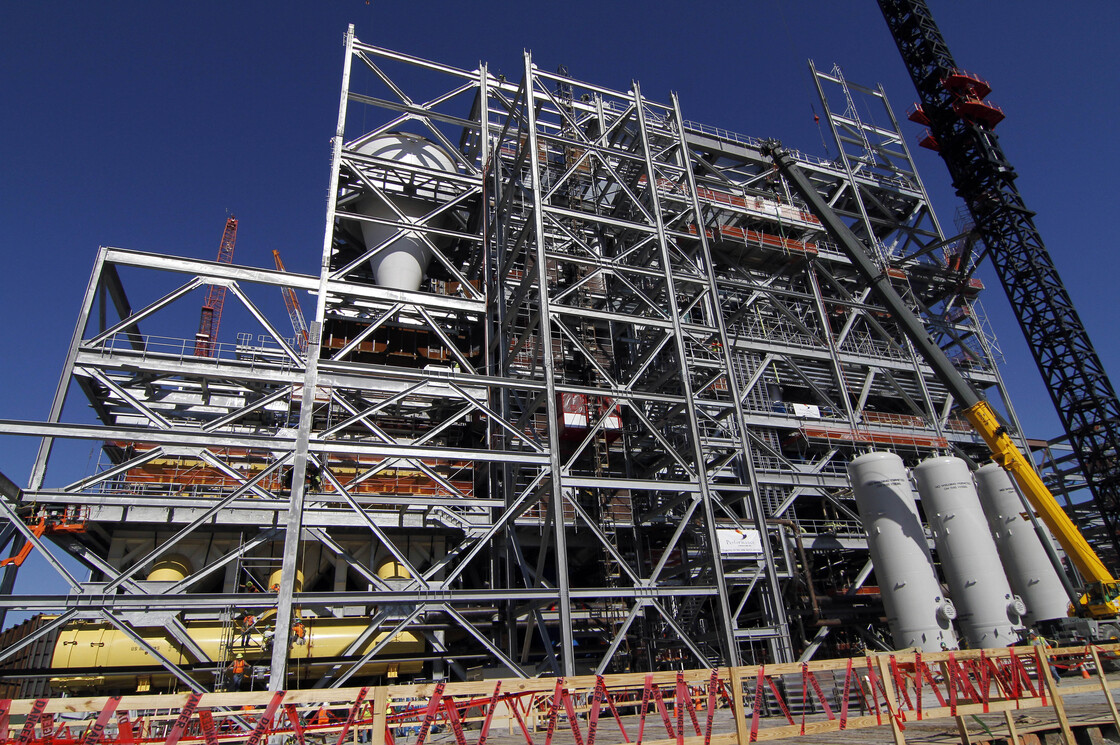
Mississippi Power's Kemper County energy facility near DeKalb, Miss., seen under construction on Nov. 13, 2012. Carbon dioxide will be captured from this plant and used to stimulate production of oil from existing wells.

Mississippi Power's Kemper County energy facility near DeKalb, Miss., seen under construction on Nov. 13, 2012. Carbon dioxide will be captured from this plant and used to stimulate production of oil from existing wells.

Rogelio V. Solis/AP

The Environmental Protection Agency's second stab at a proposal to set the first-ever limits on greenhouse gas emissions from new power plants would make it impossible for companies to build the kind of coal-fired plants that have been the country's biggest source of electricity for decades.

Under the proposal, released Friday, any new plant that runs on coal would only be permitted to emit about half as much carbon dioxide as an average coal plant puts into the air today.

EPA administrator Gina McCarthy tells NPR the steps the EPA is proposing in the rule to address climate change "can actually form the basis for a sound economy, while at the same time we can begin to tackle what is essentially the most significant public health challenge of our time."

The gasifier facility, still under construction at Mississippi Power's Kemper County energy plant on Nov. 13, 2012. Under the EPA's proposed rules, new plants that run on coal would have to find ways to emit less than half the carbon dioxide current coal plants emit.

Rogelio V. Solis/AP The gasifier facility, still under construction at Mississippi Power's Kemper County energy plant on Nov. 13, 2012. Under the EPA's proposed rules, new plants that run on coal would have to find ways to emit less than half the carbon dioxide current coal plants emit. The gasifier facility, still under construction at Mississippi Power's Kemper County energy plant on Nov. 13, 2012. Under the EPA's proposed rules, new plants that run on coal would have to find ways to emit less than half the carbon dioxide current coal plants emit.

Rogelio V. Solis/AP

The EPA proposal aims to help The White House meet its plan to cut greenhouse gas emissions by attacking the largest single source in the United States: Power plants pump out 40 percent of the nation's greenhouse gases.

The EPA's new proposal sets a limit for future power plants of 1,000 pounds of carbon dioxide per megawatt-hour for large electricity generators that are powered by natural gas. And it sets a slightly higher limit of 1,100 pounds of CO2 per megawatt-hour for small natural gas generators and for coal-fired generators.

Although the EPA says its rule is legally sound, electric utility companies are already arguing that it goes further than the law allows.

The only technologies that exist to make coal plants clean enough to meet this proposed standard, industry executives say, are far too expensive and haven't been proven at a commercial scale. Making coal plants clean enough, they say, would add hundreds of millions of dollars to the already steep price tag of coal plants.

"Our customers have to agree to foot that bill," says Nick Akins, president and CEO of American Electric Power, one of the country's largest utilities.

Akins says his customers won't go for it.

A few years ago, American Electric Power built a temporary, small-scale project that successfully captured carbon and stored it deep underground at its massive Mountaineer coal-fired power plant in West Virginia. The company proposed building a larger version at the same site and passing the costs on to consumers. But state regulators rejected that project in the end because it would increase electricity costs.

If the EPA's proposal goes forward, Akins says, companies won't build coal plants; natural gas plants are cheaper. But that strategy would make companies and their customers vulnerable to future spikes in natural gas prices, he says.

The revised proposal comes after loud complaints from industry about the first version of the proposed rule, which was released 18 months ago. That initial version proposed one standard for all power plants, regardless of their size, or the type of fuel they use.

Greenhouse gas emissions from the electricity industry already have declined because economic considerations have led utility companies to start turning away from coal. These days, utilities are building natural gas plants and wind farms instead. New technologies for drilling into deep shale deposits have opened up abundant supplies of relatively low-cost natural gas. And subsidies and technological improvements have made wind farms competitive.

Electricity companies fought hard against the EPA's first proposal largely because they see it as as a bad precedent for upcoming regulation of greenhouse gas emissions from power plants that already exist.

President Obama has told the EPA to come up with a proposal by June of 2014 to clean up the older plants. (Even though companies are already developing fewer new coal-fired plants, they're likely to rely on many of the existing coal plants for decades to come).

Environmental groups, too, are closely reading Friday's proposal, hunting for clues to how stringent the administration is likely to be when it turns in 2014 to developing new rules for existing plants.

"The sooner we get these protections in place," says Vickie Patton, general counsel of the Environmental Defense Fund, "the clearer the signal [will be] that new power plants must do their fair share in addressing the heavy burden of carbon pollution on human health and the environment."


View the original article here

Calculated To Win: Supercomputers Power America's Cup

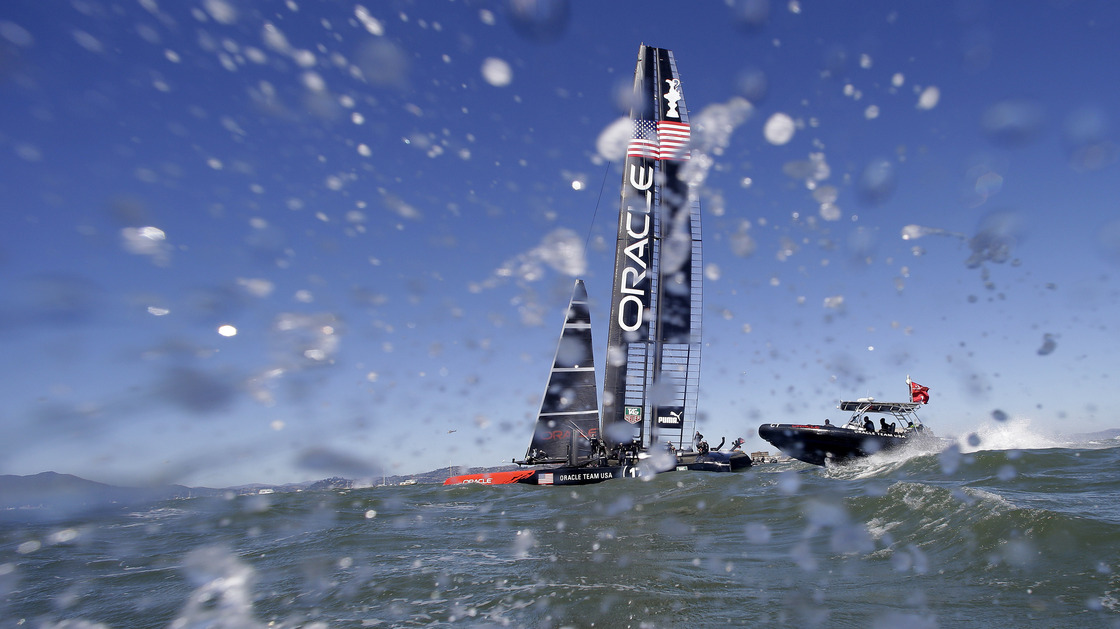
Oracle Team USA heads to the waterfront after winning the ninth race of the America's Cup with a 47-second victory over Emirates Team New Zealand.

Eric Risberg/AP Oracle Team USA heads to the waterfront after winning the ninth race of the America's Cup with a 47-second victory over Emirates Team New Zealand. Oracle Team USA heads to the waterfront after winning the ninth race of the America's Cup with a 47-second victory over Emirates Team New Zealand.

Eric Risberg/AP

The 2013 America's Cup isn't just about using human muscle to race faster than the wind. This year, the international sailing competition is about supercomputing.

Tech teams are working behind the scenes to crunch numbers and model things like how a half-degree change in wing angle could add 5 knots in speed.

The computer giant Dell, for example, is running the supercomputers for Emirates Team New Zealand's boat. Bryan Jones, Dell's vice president of marketing, says teams are testing virtual models and studying each others' designs for advantages like never before.

"You would look at: Is there applicability to my boat?" he says. If so, "I'd go back and I'd potentially do that on my boat as well."

Muscle And Brain Power

A few days ago, Emirates Team New Zealand nearly capsized in the San Francisco Bay. After near destruction, the Kiwis retooled their boat overnight, but still not enough to beat their rivals.

A radio broadcaster announced that Oracle Team USA won race No. 9 by 47 seconds, with "a completely different boat than what we've seen in the past."

America's Cup/YouTube

Watch a recap of Sunday's races.

In fact, it wasn't completely different, but it was modified. Kiwi spectator Dan Thompson says the Americans redesigned their boat, maybe to make it a little lighter. "Whatever they've done has made the difference. It's given them those extra couple of knots they were lacking the previous six or seven races," he says.

The America's Cup has always pushed the limits of technology, even from the first yachts in 1851. In 2013, they don't even have sails — they have oversized rigid wings and carbon fiber hulls that let them leap up out of the water to hydroplane on the surface.

Gilberto Nobili of Italy is the grinder for Oracle Team USA. His job is to move the ski-shaped foils on the bottom of the boat that make it fly.

Nobili huddles with a team of mathematicians and designers minutes before the race. When he's on the water, they record 3,000 variables, 10 times a second. Then they review the data for possible improvements.

"You collect the data, you get a kind of report, and then you go into a sailing team meeting, a design meeting, and you discuss which is the best way to move forward," he says.

He's not allowed to reveal exactly what the Americans changed, but he calls the process amazing. "We start the race one week ago, and the boat was different."

New Sailing Language

On the other side of this new computer-nerd/superathlete partnership is Nick Holroyd, the technical director for Emirates Team New Zealand.

A few tournaments ago, the Kiwis had about 30 sailors and 15 engineers. Now it's the other way around. "We've had to kind of sit down with the sailing team and almost invent a new language," Holroyd says.

During each race, Holroyd gets on a chase boat to monitor his team in real time. He says to move faster than the wind, the boats don't just glide on the water's surface.

"Now because we pick the boat up, you're really looking at a three-dimensional physics problem," he says. "So just the number of cases that we need to run to understand how a hull's going to behave has gone up exponentially."

Back at San Francisco's Pier 30, spectator Ricardo Romani says the end result of all of this is a leaner race, and he's a little nostalgic.

Romani likes the new boats but misses the old teamwork.

"We went from a gentleman's sport, good sailing, decent skippers, sometimes overweight — it didn't matter — to very high tech," he says. "I think this is going to [be the] start of a new era for sailing."


View the original article here

Wednesday, 4 September 2013

New HTC Desire 300 and 601 offer big power, low price

As the IFA trade show is set to get underway in Berlin this week, smart phone leader HTC is hitting the ground running with an expansive announcement that broadens its mobile device lineup, particularly extending its reach into the midrange phone market.

The new additions to HTC’s lineup are the Desire 300 and Desire 601 handsets. Both are designed to bring ample, portable power to a phone with a more modest price than the HTC One line.

The Desire 300 is the more basic of the two models, but it still packs plenty of power. Primary features include a 1GHz Qualcomm Snapdragon S4 processor, 512MB of RAM, and a 4.3-inch screen with resolution at 800 x 480 pixels. There’s 4GB of storage space, plus you get room for up to 64GB of additional storage capacity via a microSD expansion slot. Shutterbugs will find a single rear-facing camera, with a 5-megapixel lens, available for photo needs. Under the hood, the Desire 300 runs the Android 4.1.2 operating system.

The Desire 601 upgrades these specs by offering a 1.4GHz Qualcomm Snapdragon processor, 8GB of built-in storage (plus a 64GB-max microSD slot), and a full 1GB of RAM. The screen bumps things up a bit to a 4.5-inch display with HD-quality resolution of 960 x 540 pixels. As well, the Desire 601 upgrades its camera with a second, front-facing lens that offers 1.4 megapixels of resolution. Android 4.2.2 powers the handset.

With these phones, HTC is extending its specific focus on entertainment and social media through a couple of key upgrades. On the Desire 601, HTC BoomSound stereo speakers provide high-fidelity audio output that few phones can match. With rich and authentic sound quality, BoomSound combines with the phone’s spacious screen to give users a true “home theater on the go” experience.

On both the Desire 601 and 300, the HTC BlinkFeed system puts all of your content front and center where you want it the most: on your phone’s home screen. Add social media feeds and news sources to BlinkFeed, and every time you check your phone, you’ll find it updated with the latest information from all of these outlets. No need to check a dozen different sites for news and status updates; BlinkFeed puts everything in one place.

Both phones are set to launch in October of this year. Pricing has not yet been announced (except that they’ll be cheaper than the One line). All in all, this is good news for phone shoppers who have been enamored with HTC’s design aesthetic and its unique features (like BlinkFeed), but who have found the HTC One line to be a bit too expensive.


View the original article here

Tuesday, 3 September 2013

Intel's new Core i7 Extreme Edition series: Gaming power for those who can afford it

Most of us go about our daily computing tasks secure in the knowledge that something like our Intel Core i5 or AMD A6 will render our Web browser just fine. But then there are the “1 percent” of geeks who demand the best of the best for gaming and high-end computing.

Intel built its three new Extreme Edition chips, including the six-core Core i7-4960X, for members of this elite. The new processors appear atop Intel’s price list, and you can expect to pay up to $990 for the processor alone—not including a CPU cooler.

Nevertheless, if you’re interested in pulling maximum frame rates and detail levels from top-tier titles like Metro 2033 or the Crysis series, you’ll want to consider Intel’s new chips. And you’re hardly alone: Recent reports suggest that the gaming hardware market is alive and well, with hundreds of millions of dollars spent in preparing rigs for a single game.

Despite their 4000-series model numbers, the new Core i7 chips are based on Intel’s older Ivy Bridge microarchitecture, not on Haswell (the code name for the new Extreme Edition series is Ivy Bridge-E). That means it’s restricted to Socket 2011 motherboards running Intel’s X79 chipset. The good news for people looking to upgrade from a previous-gen Extreme Edition CPU is that the new chips are backward-compatible, though you’ll need to flash your board’s BIOS with new firmware. That option will save you a couple of hundred dollars, but enthusiast motherboard manufacturers will do their best to tempt you with brand-new models, too.

According to Intel, the new Core i7-4960X will deliver a performance boost of just 7 percent in 3D gaming—based on the 3DMark benchmark—over its older Core i7-3960X Extreme Edition CPU. So we may not see a rush of consumers eager to upgrade from that part. Intel provided PCWorld with a sample of the new CPU for benchmarking, but the test motherboard we ordered didn’t arrive in time for our deadline. We’ll post a follow-up story as soon as we’ve had a chance to run our own benchmarks on it.

Intel claims the new Core i7-4960X is 36 percent faster with 3D games than the newer Haswell-based Core i7-4770K part that PCWorld tested in June. Put another way, the Core i7-4960X is a beefed-up, third-generation Core chip that Intel says will outperform its high-end fourth-generation chip.

Intel Ivy Bridge-E dieIntelIntel's new Ivy Bridge-E die.

Don’t expect that advantage to be permanent. A Haswell-based Extreme Edition chip should arrive eventually. But for now, the Core i7-4960X appears to be the fastest chip you can buy from Intel.

For the true gaming aristocracy with money to burn, the Ivy Bridge/Haswell complication won’t matter. But socket issues are always a concern with PC builders. Midrange Ivy Bridge chips require Socket 1155 motherboards, Haswell chips need Socket 1150 boards, and these high-end Ivy Bridge chips need Socket 2011 boards. Each socket requires its own chipset architecture and motherboard, so upgrading from one microarchitecture to the next can be a pain. (If you’re interested in building a powerful, inexpensive Haswell system for less than $1000, check out our guide from June.)

Asus Rampage IV ExtremeAsusMotherboards such as the Asus Rampage IV Extreme have multiple PCIe slots to accommodate multiple graphics cards.

The X79 chipset that the LGA 2011 infrastructure supports includes 40 PCIe 3.0 lanes—enough to support several high-end graphics cards (using Nvidia’s SLI or AMD’s CrossFire X technology). That capability combined with a high-end CPU and lots of fast memory can make for one ferocious system.

DIYers will be able to buy Intel’s new chip through retail channels, and a number of boutique PC builders—including CyberPower, Digital Storm, Falcon Northwest, and Origin—will offer custom rigs based on the new chips.

Intel has launched three Ivy Bridge-E chips: The four-core/eight thread, 3.7GHz Core i7-4820K is priced at $310. The six-core/twelve-thread, 3.4GHz Core i7-4930K will cost $555. And the six-core/twelve-thread, 3.6GHz Core i7-4960X will go for $990.

Each of Intel’s Extreme Edition chips is an “unlocked” processor, so there are no hardware limitations for overclocking your chip (that is, making its clock run at a higher rate than stock in order to gain higher performance). In fact, these chips are designed to be overclocked. Sites such as HWBot.com publicize the accomplishments of enthusiasts who have pushed their CPUs to 5GHz and beyond, often relying on exotic cooling systems to avoid overheating. But before you consider joining their ranks, be aware that overclocking can put your entire computer at risk, and damage from overclocking is usually not covered by manufacturers’ warranties. I’ll go into more depth on overclocking shortly.

Intel Ivy Bridge-E additions

As you can see from the chart above, the new Extreme Edition processors have much higher thermal design power (TDP) than chips in the Haswell family, even though they don’t have integrated GPUs as Haswell processors do. Also, unlike Haswell processors sold in retail packaging, Ivy Bridge-E chips will lack a stock cooling system. To that end, Intel is introducing its own Liquid Cooling TS13X kit—a water block, radiator, and 120mm fan—to be sold separately for between $85 and $100. Third-party air- and liquid-cooling systems from vendors such as Antec, Corsair, and Thermaltake will also be available.

The existing X79 chipset that the Core i7-4960X relies on supports up to four channels of DDR3/1866MHz memory. In addition to the forty PCIe 3.0 lanes plumbed directly to the CPU, the X79 chipset provides eight PCIe 2.0 lanes, plus input/output architecture that includes fourteen USB 2.0 ports, six SATA ports (two of which are 6-gbps SATA (“SATA 6 Gbit/s”), eSATA, gigabit ethernet, Intel’s first-generation AVX instructions, and AES encryption acceleration.

Intel TS13x fanIntel's TS13X liquid-cooling system.

As noted earlier, Intel’s own comparisons between the new Core i7-4960X and the older i7-4770K show that the new CPU delivers a 36 percent boost in graphics, and a 37 percent boost in 3D modeling. Intel says that “everyday computing” tasks will run about 18 percent slower on the Core i7-4960X than on the Core i7-4770K (the unlocked Haswell CPU) because the newer chip lacks integrated graphics. But no one buying an Extreme Edition processor is likely to be concerned about that deficiency.

Here’s another angle to consider: improved overclocking. You can push the cores on these unlocked processors to a CPU/bus ratio of 63, versus 57 for prior chips. Assuming a 100MHz bus, that means the CPU should overclock up to 6.3GHz—though temperature, voltage, and speed-path hurdles must be surmounted along the way, an Intel spokesperson said. (Each of the chips has Intel’s Turbo Mode, which can automatically overclock a single core while running a single-threaded application, built in.)

Intel has also included a new feature: real-time core overclocking and turbo voltage control. “The previous generation Extreme Edition parts (Sandy Bridge-E) required that any change to individual per active core states, power limits or additional turbo voltage via CPU register controls required a reset to take effect,” Intel’s spokesperson explained in an email. “The new Intel Core i7 processors (Ivy Bridge-E) provide a new dimension of flexibility in that all three of these items can be controlled at the OS level without resetting the system. Therefore if an end user wants to easily toggle through overclocking states without ever leaving their application or work, it is achievable (using a tool like XTU or other ODM applications), where it was not as readily achievable in the previous generation.”

Intel’s Extreme Tuning Utility (XTU) has been upgraded to version 4.2, integrating HWbot.com support and adding an AppTune beta for application-specific tuning.

So is it worth it? Kelt Reeves, chief executive of boutique builder Falcon Northwest, weighed in.

”It’s a really nice step for the 6-core audience, with its lower power consumption and faster clock-per-clock performance,” Reeves said via email. “I don’t think it’ll blow the press away though, as the chipset remains unchanged, and the top overclock speeds are a bit lower than last gen. So the net result at the benchmark drag-races in the press are scores that are pretty similar to the last generation—not an exciting story. But for the normal professional buyer that buys their 6-core systems at standard speeds, [Ivy Bridge-E] is a win for them.”

Falcon Northwest is one of many boutique PC builders planning to offer systems based on Intel's new Extreme Edition processors.

Enthusiasts won’t need to buy a top-of-the-line i7-4960X to realize a healthy performance boost over Intel’s best Haswell processor. The “low-end,” $310 Core i7-4820K runs at a higher clock speed, has more onboard cache, and supports more memory channels—and faster memory—than a $350 Core i7-4770K (but it also requires a video card, since the Ivy Bridge-E series doesn’t have an integrated GPU).

Naysayers might turn up their nose at “just” six cores, and figure that the Ivy Bridge-E generation will close out the LGA 2011 infrastructure, forcing gamers to buy another motherboard—plus memory and a CPU—for next year’s revision. That could represent an investment of at least $1200 or so.

But for users who would consider spending more than $900 for a new CPU—the price of a midrange PC desktop with discrete graphics—the limitations probably won’t be deal-breakers. And then there’s the overclocking angle.

Gamers can also choose to buy a PC with practically all the bells and whistles they desire. According to Reeves, Falcon won’t charge a premium for the new part, and will simply swap in the Ivy Bridge-E chips for “existing 6-core offerings we have now.”

Intel’s Ivy Bridge-E processors do offer a range of pricing options for value-oriented enthusiasts. Popular X79 motherboards like the AsRock X79 Champion build in multiple PCIe slots, permitting “Frankenbuilds” that can reuse older graphics cards. Basically, if you’re a gamer who sees the need to invest several hundred dollars a year to feed your PC games habit, the new Ivy Bridge-E series should be right up your alley. And if you’re a gamer who doesn’t, there’s always a console.


View the original article here

Monday, 26 August 2013

Wall power outlets are so 2012

In the future, your phones, tablets and wearable computing gadgets won't come with chargers—they'll use inductive chargers built into desks, kitchen counters, bedside tables, cars, and other surfaces. Just placing a device on any convenient surface will charge it.

This future will be great for us lazy people, and there are environmental benefits as well.

More than one-third of the "stuff" that comes with your smartphone—plastic, wiring, and electronics—is in the charger.

Each phone has its own personal charger destined inevitably for the landfill or an environmentally unfriendly recycling center.

How dumb is that? Billions of needless devices are manufactured and discarded every year.

Also, when a mobile phone is fully charged, or when the phone is removed from the charger, the charger continues to consume energy if you leave it plugged into the wall.

The promise of wireless charging is that it could solve both of those problems. With ubiquitous wireless charging, devices would no longer need chargers and power could be managed intelligently based on the device—or on the absence of one—much more efficiently.

We have the technology. So what's the holdup?

What's it going to take for wireless charging systems to be so ubiquitous that they're built into our tables, countertops, cars and desks?

What's it going to take for smartphones, tablets, and wearable computing devices to not need dedicated internal chargers?

It's going to take a miracle. Here's why.

Yes, a few wireless charging gadgets are emerging here and there. But mostly, the product category is stuck in the dark ages.

The problem is that the wireless charging industry has three competing standards organizations and thus three different sets of standards and protocols. As a result, multiple technologies are competing to become the one true standard.

One of the standards bodies is the Power Matters Alliance (PMA), whose members include AT&T, Duracell Powermat, HTC, Huawei, Kyocera, LG, NEC, Power Kiss, Samsung, Sharp, Starbucks, ZTE and dozens of other companies. The PMA's standards and protocols are known collectively as "Power 2.0."

Then there's the Wireless Power Consortium (WPC), which includes Belkin, Energizer, HTC, Huawei, LG, Motorola, NEC, Nokia, Panasonic, Philips, Samsung, Sony, Verizon and many others. You may have heard about the WPC's devices, which are marketed under the qualcomm brand Qi (pronounced "chee").

The third wireless charging standards organization is the Alliance for Wireless Power (AWP), whose members include Deutsche Telekom, HTC, Intel, LG, Qualcomm, Samsung, SanDisk and others.

battery-charging

The PMA and WPC are the main players. The AWP was largely irrelevant in the United States until recently when, for some reason, Intel joined.

(You'll notice that some companies are in all three organizations.)

As a result of the industry's disunity, you might have to be careful when buying devices and chargers to make sure they match. And even if you do make sure your devices and chargers all adhere to the same standard, you might still find that you can't charge your gear in some public wireless charging venues.

Still, there's been a lot of progress in wireless charging.

Starbucks, Coffee Bean and McDonald's are all testing wireless charging stations in their restaurants. Starbucks has tests underway in 27 locations in Boston and Silicon Valley. Coffee Bean is testing in Los Angeles. And McDonald's has test locations in New York and Europe.

Delta Air Lines has wireless charging stations in its Sky Club lounge in New York's La Guardia Airport and at La Guardia's Marine Air Terminal.

Automakers are starting to build wireless charging stations into some car models. For example, GM plans to put wireless chargers in the Chevy Volt, starting with 2014 models and expanding to other models later. Toyota and Chrysler have previously announced support for wireless charging.

Interesting developments are happening in unexpected places.

One of the boldest is from the Korea Advanced Institute of Science and Technology (KAIST), which is testing an electric bus that recharges from buried power cables under the asphalt. Sounds cool, but the idea probably doesn't have wheels in the real world.

The European Poker Tour has announced a publicity stunt in which players will get free wireless charging via custom-made poker tables that have built-in charging mats.

The truly interesting developments in wireless charging for you and me, however, are happening in the smartphone and tablet worlds.

Google's new Nexus 7 represents something close to the future of wireless charging. It comes with wireless charging capability without an additional kit or add-on. Although it comes with a conventional wired charger, it doesn't come with its own wireless charger. You have to buy that separately.

If all handset and tablet makers adopted wireless charging for their devices and didn't include chargers with their products—wireless or otherwise—every gadget buyer would be forced to buy an all-purpose charger, and the industry would be on its way toward wireless nirvana.

The U.S. version of the Verizon LG G2 gets it right, too, with wireless charging out of the box. The phone should become available through Verizon on September 12.

The Samsung Galaxy S4 has an optional wireless charging kit. The upgrade requires the replacement of the phone's back cover, which makes the device thicker. The phone's S Charger kit uses the Qi standard, so it should charge with any Qi charger.

An unconfirmed rumor says the still-unannounced BlackBerry Z30 will have Qi-based wireless charging. The rumor was started when the WPC included the device on its list of supporting gadgets.

Apple's various iPhones don't support wireless charging, unless you buy a separate case. Doing so adds a lot of bulk and heft to the iPhone. But it might be worth it.

Buqu Tech's Magnetyze wireless charging case for the iPhone 5 is one new option. (The company also makes similar cases for the iPhone 4 line and the Samsung Galaxy S3).

The ZENS wireless charging flip case is another option for the iPhone 5. (ZENS makes similar cases and pads for a wide variety of handset models.)

Sadly, most smartphones don't have wireless charging capability built in, or wireless charging aftermarket options.

Because of the standards wars, you have to choose between Power 2.0 and Qi universal chargers, if you want to go the wireless route. In general, however, Qi is the way to go for phones and tablets.

Energizer (you know, the bunny people) has a range of universal Qi chargers and smartphone cases.

You can also buy Qi charging plates from LG, Monster Watts, AGPtek, Esorun, and others.

Some phones, such as the Nexus 4, the Nokia DT-900 and the LG WCP-300, have wireless Qi chargers that work pretty well with other Qi devices. The only problem is that they tend to be too small for charging tablets.

As you can see from my brief survey here, wireless charging is slouching toward some kind of ubiquity.

What we really need is one standard, and a handset and tablet industry that stops shipping chargers of any kind, but makes sure every device has wireless charging capability built in.

If that happened, we would be forced to embrace a new model where universal charging pads are found throughout our homes and in our offices and cars, and we would save time, money and energy because every device wouldn't come with its own dumb charger.


View the original article here

Monday, 5 August 2013

Twitter tosses power users a bone in Windows 8 app update

Windows 8 socialites rejoice! Twitter recently beefed up its Windows 8 app, extending functionality for power users and adding the ability to follow specific people or lists from the Start Screen.

Available now in the Windows Store, the biggest addition to Twitter for Windows 8 is the ability to add multiple accounts. Most Twitter fans won’t have any use for the feature, but power users will welcome the upgrade, as will anyone who needs to maintain separate personal and professional accounts.

To sign-in with multiple accounts, you just swipe down from the top or bottom of your tablet, or right-click on a PC. In the drop-down bar that appears, tap the user icon in the top right corner. This will switch the icon to a plus sign and a second tap brings up an account credentials entry window, allowing you to add another account. You can also sign-up for a new account from this page, but in my tests, adding a new account hung every time I tried to choose a Twitter username.

Switching between accounts is as simple as swiping down or right-clicking again, and then tapping on the account you want to use.

PCWorld's Twitter lists.

The latest Twitter update also brings Twitter lists to the Windows 8 app, and the ability to pin user profiles or Twitter lists to the Start Screen. Pinning is a great addition if you don’t want to miss any updates from a specific users or set of users. Twitter lists aren’t confined to your own lists either; you can pin any Twitter list you can find to your start screen.

Pinned lists and profiles are relegated to small tile status on the Start screen.

Say, for example, you wanted to pin blogger Robert Scoble’s Tech Pundits list. You’d navigate to Scoble’s list inside the Twitter app, swipe down or right-click, and then select the option to “Pin to Start” in the lower left corner. Pinned profiles and lists appear as small tiles with live updates. The only downside is you don’t have the option to upgrade your pinned tiles to a more reading-conducive larger-sized tile.

Twitter’s new update for Windows 8 also addresses some bugs and overall performance issues, such as faster response times. Many users posting comments on the Windows Blog say the new update has fixed their stability issues that were causing numerous crashes with the previous version of Twitter. Users have also noticed several unannounced features such as user tagging when composing tweets, improve responsiveness to touch, and more frequent feed updates.

It’s good to see Twitter continuing to update its Windows 8 app as it is one of the few truly useful social networking apps available right now in the Windows Store.

Ian is an independent writer based in Tel Aviv, Israel. His current focus is on all things tech including mobile devices, desktop and laptop computers, software, social networks, Web apps, tech-related legislation and corporate tech news.
More by Ian Paul


View the original article here

Thursday, 25 July 2013

StandScan Pro Power Bundle

Pros Turns assorted smartphones and tablets into more reliable scanners. Portable. Includes LEDs to illuminate the scan target.

Cons Can't adjust distance from camera to target to change field of view. Bottom Line Basically a box with a peephole on top for a camera to take pictures through, the StandScan Pro Power Bundle turns smartphones and tablets into better portable scanners.

By M. David Stone

Similar in concept to the ScanJig that I recently reviewed, but notably different in design, the StandScan Pro Power Bundle offers a slightly different way to turn your phone or tablet into a better scanner. Compared with the ScanJig, it gets extra points for offering its own LEDs instead of depending on ambient light, but it also costs a little more, which puts the two products on equal footing overall.

Compare Selected

The argument for the StandScan Pro relative to traditional scanners is the same as for the ScanJig. As I've pointed out in any number of scanner reviews, taking a picture with a camera phone or tablet is fully equivalent to scanning. That makes both phones and tablets excellent alternatives to portable manual-fed, simplex (one-sided) scanners, like the Fujitsu ScanSnap S1100 and the Epson WorkForce DS-30. Like the ScanJig, the StandScan Pro makes it easier to get good quality scans with a camera, and it also speeds up scanning for multiple pages.

Like the ScanJig also, the StandScan Pro solves the problem of trying to hold the camera absolutely steady while also filling as much of the frame as possible to take best advantage of the camera's resolution.

Basics
The StandScan Pro is basically a box with a trapezoidal cross section, one open side, a peephole on the top for the camera to look through, and a base that's a little larger than a letter-size piece of paper. The open side lets you reach in to put the scan target in the base or take it out. In addition, there's a strip of LEDs on the inside of the top, providing consistent lighting.

The StandScan Pro actually comes in two versions. The StandScan Pro itself comes with a battery pack for a 9-volt battery. The StandScan Pro Power Bundle also includes a second battery pack for eight AA batteries plus an AC power adaptor. The difference is significant. With the 9-volt battery I measured the brightness at the center point on the scan bed at only about 500 lux with a fresh battery. With AC power and with the AA battery pack, I measured between 1,319 and 1,363 lux, with the reading varying over time.

The range from 1,319 to 1,364 lux isn't enough to see a difference. The drop to 500 lux is. More important, it makes a significant difference in how well an optical character recognition (OCR) program can recognize text in the resulting file. In my tests, using Abbyy FineReader 9.0, the program managed to read text on our standard scanner test pages as small as 6 points for Arial font and 8 points for Times New Roman font without a mistake for images taken with AC power. With the 9-volt battery pack, the accuracy dropped. The smallest size the software could read without a mistake was 10 points for both fonts.

More Basics
As with the ScanJig, there's a fixed distance between the camera and the document with the StandScan Pro, so the field of view for some cameras may not be big enough to include an entire page. Rather than name specific supported devices, the StandScan Pro Web site suggests that you hold your phone 31 centimeters above a letter-size page and make sure it can see all four corners of the page. If it can, it's compatible with the StandScan Pro

In my tests the StandScan Pro worked well with a Samsung Galaxy S III and with an Apple iPhone 4S. However, I couldn't see the entire page with a Motorola Droid RAZR MAXX, an HTC Droid Incredible, or an iPad 2. Another potential issue is that the top of the StandScan Pro box may not be large enough to let you balance your tablet on it. Quite aside from not being able to see a full page with the iPad 2, I had to hold the tablet with one hand to keep it from falling off the box.

Keep in mind also that, as with any scanner, what you can actually do with your scans depends on software, and the StandScan Pro doesn't come with any. There are plenty of apps you can get elsewhere, but the point is that you have to get them separately, and, in many case, pay for them. For my tests, I scanned using the default camera app in the phones and tablets I tested with. I used Abbyy FineReader 9.0 for text recognition mostly because I had it on hand.

The Unfolding Story
Setting up the StandScan Pro involves unfolding it, bending pieces along various creases, and positioning the sides so embedded magnets will hold the overlapping edges together. I found this a little hard to do the first time, mostly because I had to figure out which parts to bend. After doing it once, however, it was easy to break the StandScan Pro down to fold it into a flat, highly portable format, and at least as easy to unfold and snap it back into its working state.

The box is made from laminated heavyweight card stock, which feels a little flimsy when you're trying to put it together. However, it holds together well once all the magnets are properly aligned. The total weight is only about 11 ounces, making it light enough to bring with you without a second thought.

...And Scan
Scanning with the StandScan Pro is simply a matter of snapping a picture. As with the ScanJig, you can put a stack of pages on the document bed and work your way through them, one page at a time, fairly quickly. It took me about one minute to scan 10 pages, which is a match for the ScanJig and a lot faster than with most manual-fed scanners. As with the ScanJig also, scan quality will depend on your phone or tablet and the app you're using.

The StandScan Pro Power Bundle is the sort of gadget that the more you use it, the more you'll appreciate it. Having its own light source is a plus, but then again, having the light source is more important for the closed-box design than for the ScanJig's open design that takes full advantage of ambient light. These two products are so closely matched that choosing between them really boils down to personal taste. That said, however, the StandScan Pro Power Bundle is certainly a reasonable choice for anyone who wants to use his or her phone or tablet as a scanner substitute.


View the original article here